
The short version
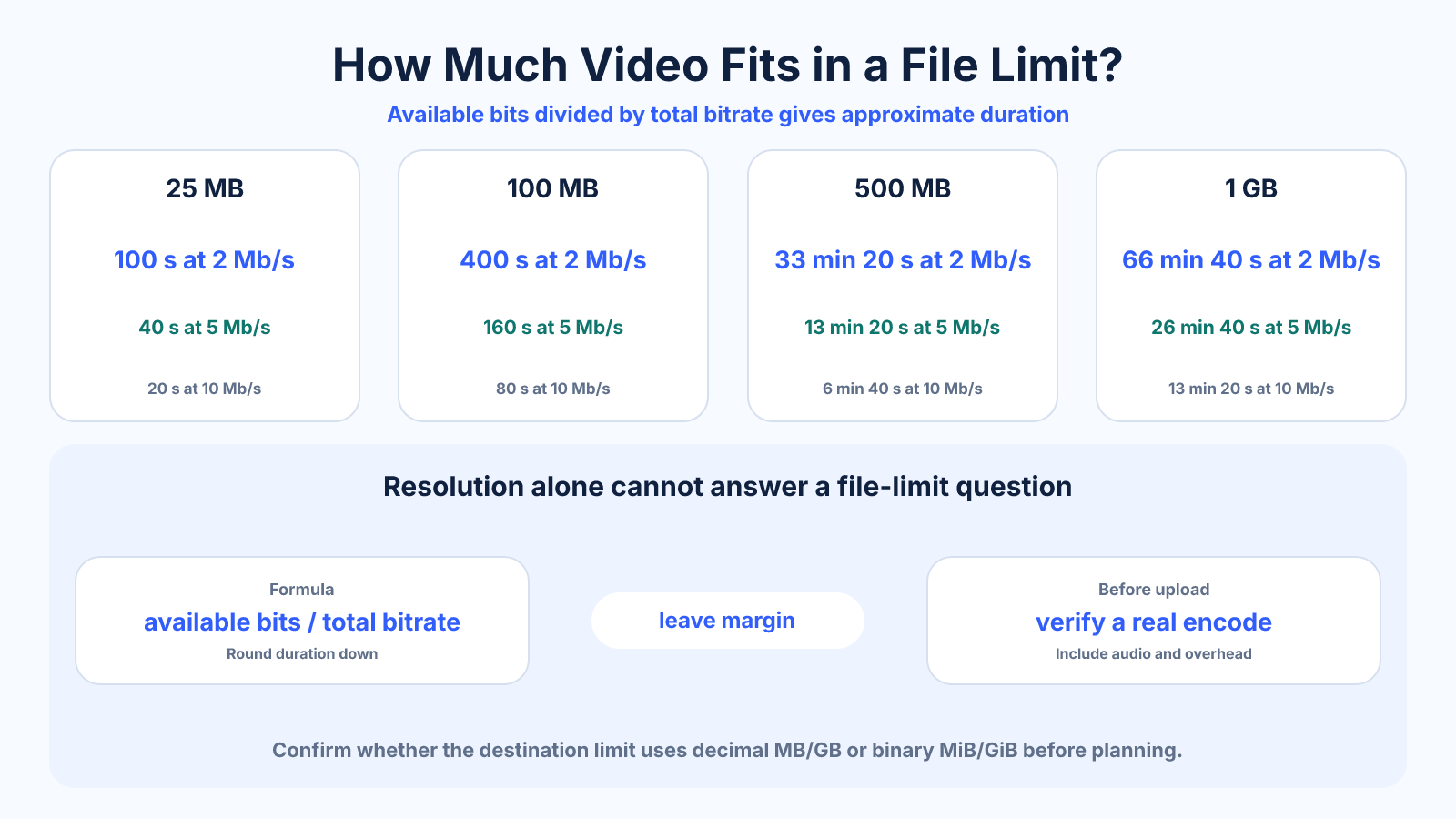
Video duration equals available bits divided by total bitrate. At 5 Mb/s total, 100 decimal MB holds about 160 seconds before overhead; at 10 Mb/s it holds about 80 seconds. Resolution alone cannot answer the question because compressed bitrate varies.
Use this guide when
Use this guide for quick duration ranges at familiar limits such as 25 MB, 100 MB, 500 MB and 1 GB.
Choose a different guide when:
- To calculate from a device's exact storage, read How to Calculate Video Recording Time from Storage and Bitrate.
- To choose an encoding bitrate for an exact limit, read How to Choose a Bitrate for a Target Video File Size.
What matters most
- Use combined video and audio bitrate.
- File-size labels may use decimal MB or binary MiB.
- Reserve overhead and variable-bitrate tolerance below strict limits.
How to apply it
- Confirm the storage limit and its unit.
- Subtract a safety margin and any fixed non-media overhead.
- Add video, audio and other stream bitrates.
- Convert available bytes to bits and divide by bits per second.
- Round duration down and verify with a real encode.
Reference table
| Limit | At 2 Mb/s total | At 5 Mb/s total | At 10 Mb/s total |
|---|---|---|---|
| 25 MB | 100 s | 40 s | 20 s |
| 100 MB | 400 s | 160 s | 80 s |
| 500 MB | 33 min 20 s | 13 min 20 s | 6 min 40 s |
| 1 GB | 66 min 40 s | 26 min 40 s | 13 min 20 s |
Use exact dimensions and units in production notes; familiar labels can describe more than one standard.
Calculate duration from available bits
Convert the available file size to bits and divide by the combined stream bitrate. For 100 decimal MB, 100,000,000 bytes × 8 equals 800,000,000 bits. Dividing by 5,000,000 bits per second gives 160 seconds, or two minutes forty seconds.
This is a nominal estimate. An MP4 container includes indexing and metadata, while a variable-bitrate encode may not land exactly on its target. For a strict portal, reduce the available size by a safety percentage before performing the division.
- Bytes × eight gives bits.
- Sum all stream bitrates.
- Convert the final seconds into minutes only after calculation.
Confirm what MB and GB mean
Decimal storage uses 1 MB = 1,000,000 bytes and 1 GB = 1,000,000,000 bytes. Binary units use 1 MiB = 1,048,576 bytes and 1 GiB = 1,073,741,824 bytes. Interfaces sometimes label binary measurements as MB or GB, so check the destination's documentation or test behavior.
Never confuse MB with Mb. A byte contains eight bits, so a 5 MB/s data rate is eight times a 5 Mb/s bitrate. Write units explicitly in production notes and calculator inputs.
- Distinguish B for bytes from b for bits.
- Ask whether limits are decimal or binary.
- Use one unit system throughout a calculation.
Select a realistic total bitrate
The duration table can be read in reverse: longer video inside the same limit requires a lower total bitrate. Whether that rate is acceptable depends on resolution, frame rate, codec and content. A presentation with static slides may remain clear where fast textured footage fails.
Allocate audio intentionally. Speech can often use less data than complex music, but do not reduce it until voices become tiring or indistinct. The remaining video budget should be tested on the most difficult scenes at the intended viewing size.
- Treat the calculated duration as a budget.
- Test the content, not just the numbers.
- Include audio quality in the decision.
Stay safely below a hard upload limit
Reserve two to five percent as a practical starting margin, with more when the encoder is unpredictable or the portal rejects rather than transcodes oversized files. Calculate from exact duration and inspect the resulting byte count using the same unit convention.
If the first export is too large, use its measured size to refine the bitrate proportionally. Avoid cutting resolution, frame rate and bitrate simultaneously; a controlled adjustment reveals what solved the constraint and what affected quality.
- Round permissible duration down.
- Measure the actual output file.
- Refine one controlled variable at a time.
Common mistakes to avoid
- Estimating duration from 1080p or 4K labels alone.
- Mixing megabytes with megabits.
- Spending the complete limit without an overhead reserve.
- Using average bitrate when the destination enforces a peak-rate constraint.
Continue with the right tool
Use a calculator to check the numbers against your own source and destination instead of relying on a generic preset.
Related guides
How to Calculate Video File Size from Bitrate and Duration
Estimate video storage from total bitrate and running time, with worked examples and the difference between decimal MB and binary MiB.
Video framing and deliveryHow to Choose a Bitrate for a Target Video File Size
Calculate a safe video bitrate from duration and target file size while reserving space for audio, container overhead and variation.
Video compression and file sizeHow to Calculate Video Recording Time from Storage and Bitrate
Estimate camera or screen-recording time from card capacity and total bitrate while allowing for audio, overhead and variable data rates.
Frequently asked questions
How many minutes is a 100MB video?
It depends on total bitrate: about 6.7 minutes at 2 Mb/s, 2.7 minutes at 5 Mb/s or 1.3 minutes at 10 Mb/s before overhead.
Does 1080p determine how long the video can be?
No. Different codecs, bitrates, frame rates and scenes produce different compressed sizes at 1080p.
Should audio bitrate be included?
Yes. Add every audio track and any other significant stream to video bitrate.
Why should duration be rounded down?
Muxing overhead and bitrate variation can make the real file larger than a simple estimate.