
The short version
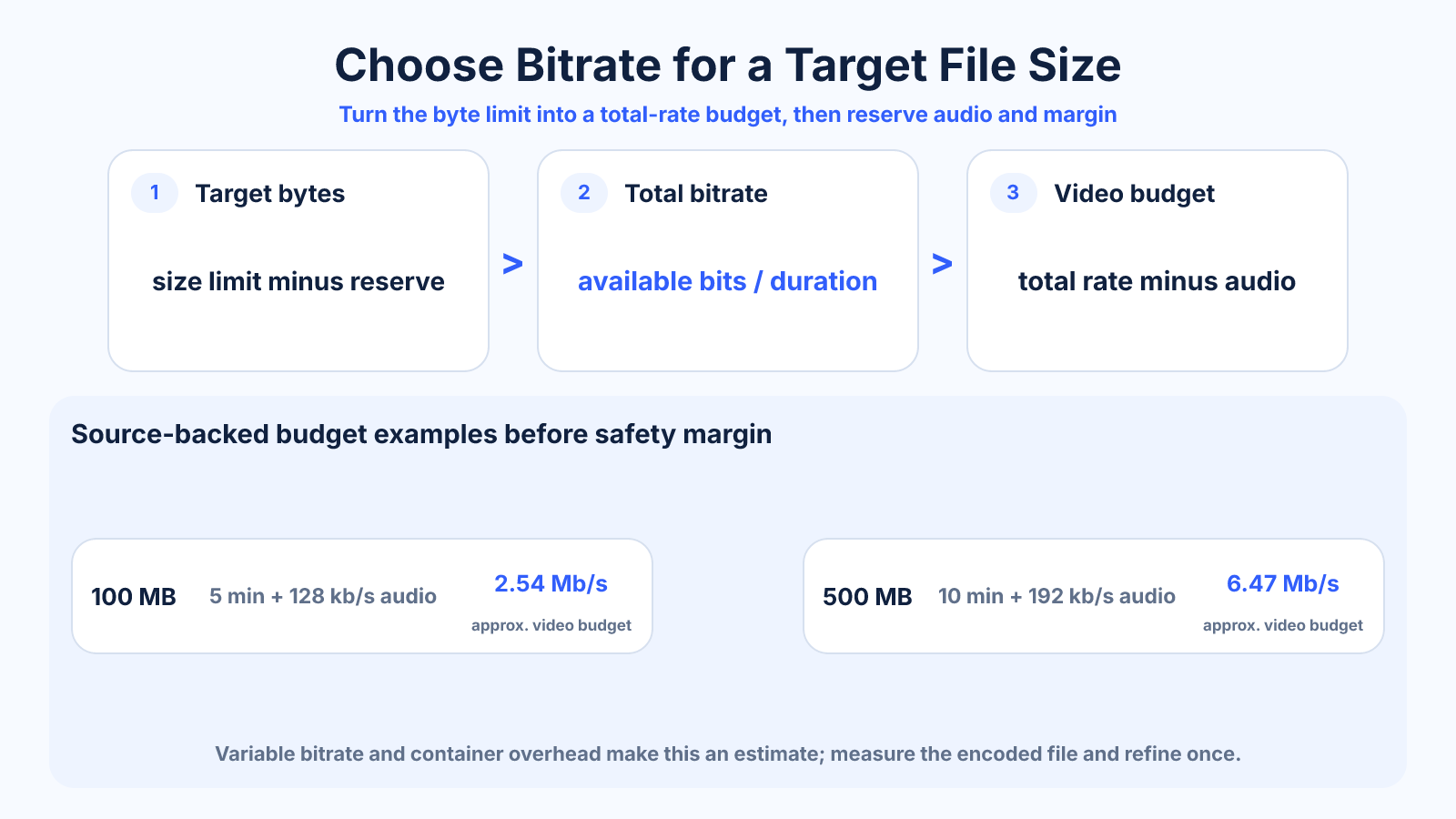
Convert the target size to bits, divide by duration to get the total bitrate, then subtract audio bitrate and a safety margin. The remaining value is the average video bitrate budget. Test the encoded output because variable bitrate and container overhead prevent a perfectly exact prediction.
Use this guide when
Use this guide when file-size limit and duration are known and you need a safe video bitrate budget.
Choose a different guide when:
- To predict size from an existing bitrate, read How to Calculate Video File Size from Bitrate and Duration.
- To build the complete upload workflow, read How to Prepare a Video for an Upload File-Size Limit.
What matters most
- File-size budgets apply to total bitrate, not video bitrate alone.
- Longer duration means fewer bits per second at the same size.
- A safety margin prevents small estimation errors from exceeding a hard limit.
How to apply it
- Choose whether the limit uses decimal MB or binary MiB.
- Reserve 2–5% for overhead and encoder variation.
- Convert the remaining bytes to bits and divide by exact duration.
- Subtract combined audio and other stream bitrates.
- Encode a representative test or full pass, measure the file and refine once.
Reference table
| Target | Duration | Audio | Approx. video budget before margin |
|---|---|---|---|
| 25 MB | 60 s | 128 kb/s | 3.21 Mb/s |
| 100 MB | 5 min | 128 kb/s | 2.54 Mb/s |
| 500 MB | 10 min | 192 kb/s | 6.47 Mb/s |
| 1 GB | 20 min | 192 kb/s | 6.47 Mb/s |
Use exact dimensions and units in production notes; familiar labels can describe more than one standard.
Work through the bitrate formula
For a 100 MB decimal limit and a five-minute duration, 100,000,000 bytes × 8 ÷ 300 seconds equals about 2.667 Mb/s total. Subtract 0.128 Mb/s for audio and the nominal video budget is about 2.539 Mb/s before a safety margin.
With a 4% reserve, start closer to 2.44 Mb/s video rather than aiming at the mathematical edge. The exact reserve is a production decision: strict portals and variable outputs need more tolerance than a platform that merely displays an approximate recommendation.
- Convert bytes to bits by multiplying by eight.
- Use seconds, not rounded minutes.
- Subtract audio after calculating total bitrate.
Resolve units and overhead before encoding
Storage limits may use decimal megabytes, where 1 MB equals 1,000,000 bytes, while operating systems sometimes display binary mebibytes, where 1 MiB equals 1,048,576 bytes. That difference is enough to break a strict limit when the target is close.
Containers also store timing, indexing and metadata in addition to media streams. Multiple audio tracks, subtitles and attachments consume more space. Include every stream in the budget and measure with the same unit the destination uses.
- Confirm MB versus MiB.
- Include all audio and subtitle streams.
- Do not spend the entire stated limit.
Allocate the available bitrate intelligently
Once duration fixes the available bitrate, choose a resolution and frame rate the budget can support. A small budget spread over unnecessary 4K pixels may show more artifacts than a clean 1080p export. Preserve source cadence and avoid spending pixels on an upscale.
Content complexity matters. A talking-head presentation can tolerate a lower bitrate than grainy handheld footage at the same raster. Test the hardest section, and consider a more efficient codec only when the destination supports it and decoding compatibility has been verified.
- Reduce resolution before destroying detail with compression.
- Keep native frame cadence.
- Test motion, grain and gradients.
Verify and refine with one measured pass
After encoding, measure the actual byte size and inspect visual quality. If the file is comfortably under the limit, decide whether the remaining space would visibly improve the difficult scenes. If it is over, recalculate from the measured difference instead of making arbitrary percentage cuts.
Keep the successful settings with the exact duration and encoder version. A preset validated for one duration cannot guarantee another size, but the documented workflow makes future estimates quicker and prevents confusion between total and video-only bitrate.
Common mistakes to avoid
- Treating MB and Mb as the same unit.
- Using rounded minutes when the program has extra seconds.
- Allocating the entire budget to video and forgetting audio.
- Using a quality-based encode when the file must stay below a strict maximum.
Continue with the right tool
Use a calculator to check the numbers against your own source and destination instead of relying on a generic preset.
Related guides
How to Calculate Video File Size from Bitrate and Duration
Estimate video storage from total bitrate and running time, with worked examples and the difference between decimal MB and binary MiB.
Video quality and deliveryHow to Reduce Video File Size Without Visible Quality Loss
Make video files smaller by choosing an efficient codec, sensible bitrate, resolution and audio settings while protecting visible detail.
Video framing and deliveryHow to Convert Video Aspect Ratio Without Stretching
Convert a video to a new aspect ratio using crop, padding or reframing while preserving natural proportions and export quality.
Frequently asked questions
What formula calculates target bitrate?
Total bitrate in bits per second equals target bytes × 8 divided by duration in seconds. Subtract audio and reserve margin for the video budget.
How much safety margin should I use?
Two to five percent is a practical start, but the encoder, container and strictness of the limit determine the appropriate margin.
Why did two-pass encoding miss the exact size?
Average targets, muxing overhead, metadata and encoder behavior are not perfectly exact.
Can a very low bitrate preserve 4K quality?
A 4K raster can be encoded at any supported bitrate, but insufficient data produces artifacts and may offer no advantage over a smaller frame.