
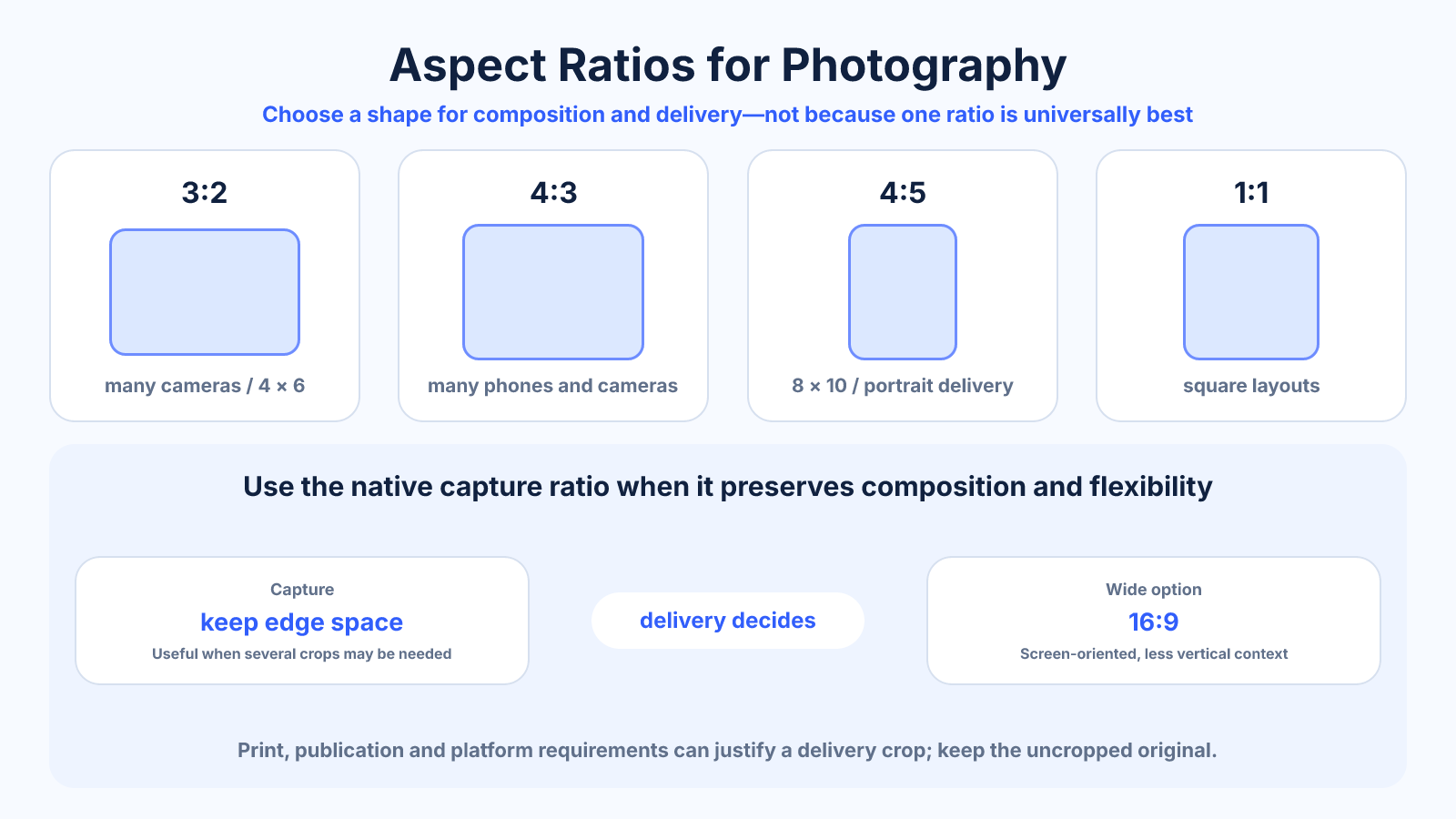
The short version
Use the camera's native ratio when it suits the composition and preserves maximum flexibility. Choose a delivery ratio only when a print, publication or layout requires it. Capture with safe edge space when one photograph must support several crops.
What matters most
- No aspect ratio is universally best for photography.
- Native capture usually preserves the largest sensor area.
- Print and social destinations can require compositions different from capture.
How to apply it
- Identify the camera's native output and maximum dimensions.
- Choose the composition around subject direction and intended story.
- List required print, web and social crops before shooting.
- Leave safe edge room or capture alternate orientations for important uses.
- Crop from the master and verify remaining resolution for each output.
Reference table
| Ratio | Common relationship | Visual character | Watch for |
|---|---|---|---|
| 3:2 | Many cameras and 4×6 print | Moderately wide | 8×10 needs crop |
| 4:3 | Many phones/cameras | Balanced frame | 3:2 print needs crop |
| 4:5 | 8×10 and portrait social | Tall portrait | Large crop from landscape |
| 1:1 | Square layouts | Centered and graphic | Removes horizontal/vertical context |
| 16:9 | Screens and video | Wide cinematic feel | Less height for portrait subjects |
Use exact dimensions and units in production notes; familiar labels can describe more than one standard.
Separate capture ratio from delivery ratio
Capture ratio describes the frame recorded from the camera or sensor mode. Delivery ratio describes the crop required by a print, screen or publication. Keeping these decisions separate preserves options: one full master can produce several carefully positioned derivatives.
In-camera framing remains valuable because it shapes how you see the scene, but retain a full-resolution original when the workflow permits. A visual mask or guide can support composition without permanently removing edge pixels needed by another destination.
- Preserve a flexible master.
- Use guides for intended crops.
- Export destination derivatives separately.
Choose shape from subject and visual movement
Landscape ratios support horizontal movement, groups and environmental context. Portrait ratios emphasize height, upright figures and phone layouts. Square frames create symmetry and graphic tension but can remove directional space around a moving or looking subject.
Ratio does not create composition automatically. Position, balance, negative space and visual hierarchy still decide whether the frame works. Make the crop while viewing the final shape rather than calculating dimensions and assuming the centered result is artistically correct.
- Preserve look room and direction.
- Use negative space intentionally.
- Judge the final shape, not just numbers.
Anticipate common print crops
A 3:2 camera frame matches 4×6 and 12×18, while 8×10 and 16×20 are 4:5 and require a narrower crop. A 4:3 source matches neither family exactly. Paper, mat opening and lab bleed can remove additional edge area.
Choose the print before placing signatures, borders or critical details. Calculate post-crop pixels and required DPI. If the composition cannot lose edges, fit the image inside the paper and design borders intentionally.
- Match ratio before calculating DPI.
- Allow for lab bleed and trim.
- Use borders when the complete frame matters.
Photograph for several outputs
When a campaign needs landscape, square and vertical versions, capture extra background around the subject and keep important elements away from edges. For controlled scenes, shoot alternate compositions rather than expecting one frame to solve every layout.
Record destination crops in the shot list and preview overlays during selection. Create derivatives from the same color-corrected master, naming ratio and pixel dimensions clearly. This maintains consistency without chaining one cropped export into another.
Common mistakes to avoid
- Choosing ratio only because it is popular on one platform.
- Cropping in camera without retaining a full sensor file when possible.
- Assuming a print label matches the camera's native shape.
- Leaving no room for several required derivatives.
Continue with the right tool
Use a calculator to check the numbers against your own source and destination instead of relying on a generic preset.
Related guides
Standard Photo Sizes: Print Dimensions, Ratios and Pixels
Compare common photo print sizes, their aspect ratios and pixel dimensions at 300 PPI before cropping or ordering prints.
Image cropping and print preparationHow to Crop a 3:2 Photo for 4×5, 5×7 and 8×10 Prints
Prepare a 3:2 camera image for common print ratios with exact crop examples, resolution checks, bleed and composition guidance.
Image cropping and print preparationHow to Crop an Image to an Aspect Ratio Without Stretching
Calculate and position an exact aspect-ratio crop while preserving natural proportions, important content and enough pixels for output.
Frequently asked questions
Is 3:2 better than 4:3?
Neither is inherently better. They reflect different capture systems and compositions.
Which ratio is best for portraits?
4:5 and 3:4 often suit upright subjects, but environment and destination matter.
Should I shoot for Instagram's ratio?
If Instagram is the only destination, it can guide composition. Otherwise preserve a flexible master and plan the later crop.
Does changing ratio change megapixels?
Cropping to another ratio reduces retained pixels; changing a ratio setting may use a smaller sensor area.