
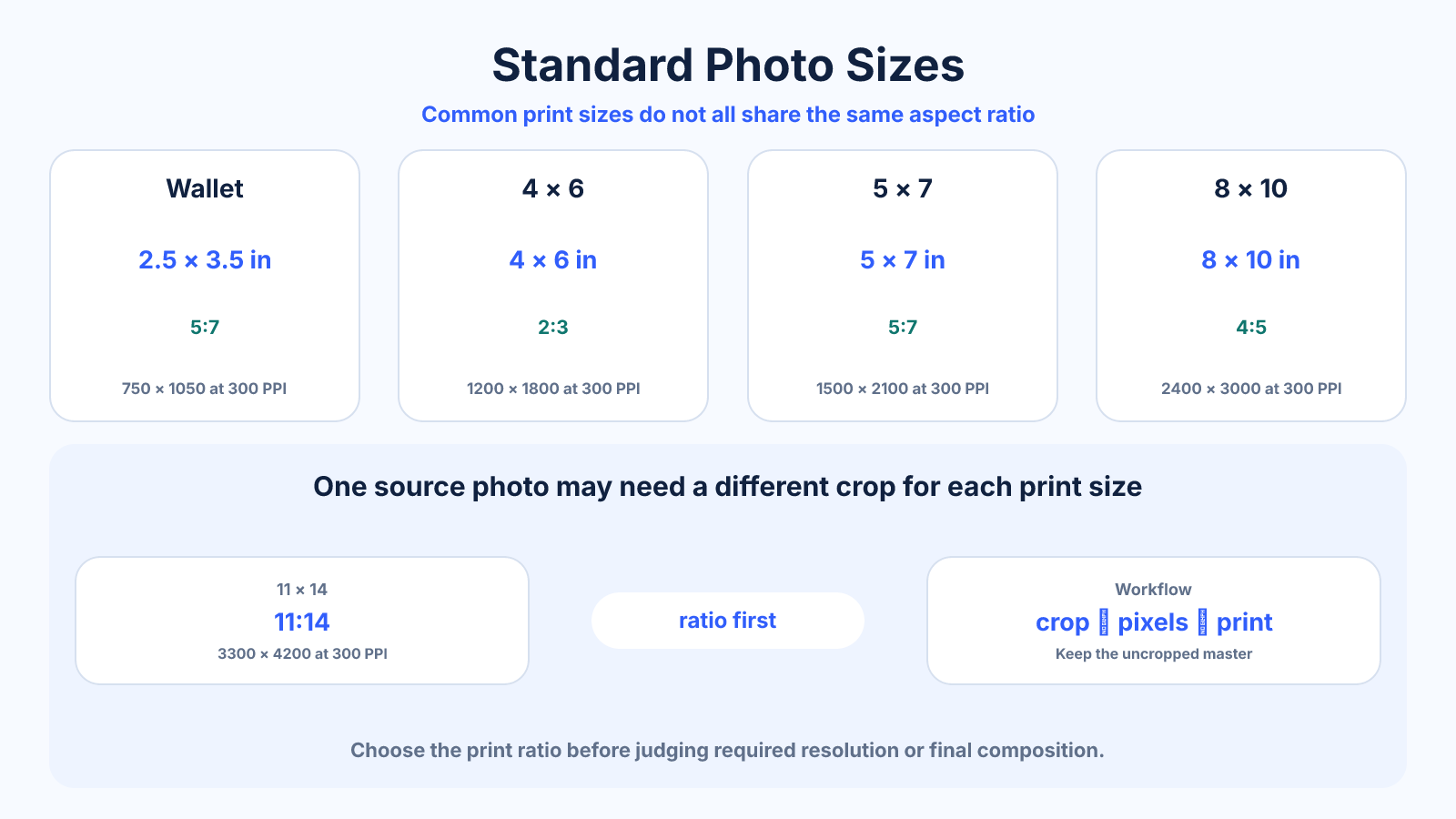
The short version
Common US photo prints include 4 × 6, 5 × 7 and 8 × 10 inches. They use different aspect ratios, so one camera image may require a crop to fit every size.
What matters most
- 4 × 6 is 3:2, 5 × 7 is 7:5 and 8 × 10 is 5:4.
- At 300 PPI, multiply each inch dimension by 300 for target pixels.
- Leave extra image area for lab bleed and small alignment differences.
How to apply it
- Choose the physical print size.
- Compare its ratio with the source photo ratio.
- Preview and position any required crop.
- Export at the lab's requested pixels, color space and file format.
Reference table
| Aspect ratio | Pixels at 300 PPI | |
|---|---|---|
| Wallet 2.5 × 3.5 in | 5:7 | 750 × 1050 |
| 4 × 6 in | 2:3 | 1200 × 1800 |
| 5 × 7 in | 5:7 | 1500 × 2100 |
| 8 × 10 in | 4:5 | 2400 × 3000 |
| 11 × 14 in | 11:14 | 3300 × 4200 |
Use exact dimensions and units in production notes; familiar labels can describe more than one standard.
Standard photo sizes in inches, centimeters and pixels
A print size describes the finished paper dimensions, not the number of pixels in the file. A 4 x 6-inch print is approximately 10.16 x 15.24 cm; 5 x 7 is 12.7 x 17.78 cm; and 8 x 10 is 20.32 x 25.4 cm. Pixel requirements depend on the density requested by the lab.
At 300 pixels per inch, multiply each edge in inches by 300. That produces 1200 x 1800 pixels for 4 x 6, 1500 x 2100 for 5 x 7, and 2400 x 3000 for 8 x 10. At 240 PPI, the same prints need fewer pixels: 960 x 1440, 1200 x 1680 and 1920 x 2400 respectively.
Why changing print size can crop the photo
Popular prints do not share one aspect ratio. A 3:2 camera image fits 4 x 6 exactly, but 5 x 7 is slightly squarer and 8 x 10 is squarer again. Moving between these sizes changes the frame shape, so a lab may trim the long edges unless you reposition the crop or add a border.
For a 6000 x 4000 landscape photo, an exact 8 x 10 crop uses a 5:4 frame. Keeping the full 4000-pixel height gives a 5000-pixel width, so 1000 horizontal pixels are removed in total. If an important subject sits near either edge, choose a bordered fit or a different print ratio.
Frames, mats and lab bleed
The labeled frame size normally refers to the print it accepts, but a mat opening is often slightly smaller so the paper cannot fall through. That means a few millimeters near the edge may be hidden even when the print itself is not cropped. Keep signatures, captions and faces comfortably inside the visible area.
Borderless labs may enlarge the image slightly to prevent a white edge caused by cutting tolerance. This extra trim is not identical at every provider. Treat the lab's crop preview, bleed guidance and color-profile request as the final authority, and avoid placing essential content against the boundary.
Choose a realistic print resolution
A 300 PPI target is useful for close-viewed photographic prints, but it is not a universal pass/fail line. A clean file at 240 PPI can print very well, while a large poster viewed from farther away may work at a lower effective density. Source focus, noise, sharpening and printer process also affect the result.
Do not resample a small image merely to make its metadata say 300 PPI. First divide available pixels by the intended inches to find the real effective PPI. If it is low, reduce the print size, choose a more distant viewing use, or test a careful upscale and inspect an actual proof.
Common mistakes to avoid
- Assuming all standard prints share the camera's 3:2 ratio.
- Letting an automatic crop remove heads or text.
- Using 300 PPI as an absolute rule regardless of viewing distance or printer guidance.
Continue with the right tool
Use a calculator to check the numbers against your own source and destination instead of relying on a generic preset.
Related guides
4×6 Photo Dimensions: Inches, Centimeters, Ratio and Pixels
Find the exact dimensions and 3:2 aspect ratio of a 4×6 photo, including pixels for 150, 240 and 300 PPI printing.
Images and photos5×7 Photo Dimensions: Ratio, Centimeters and Print Pixels
Check 5×7 photo dimensions, its 5:7 aspect ratio and the pixels required for common print densities.
Image cropping and print preparationWhich Aspect Ratio Should You Use for Photography?
Choose between 3:2, 4:3, 4:5, 1:1 and panoramic photo ratios based on capture, composition, print and delivery needs.
Frequently asked questions
What is the most common photo print size?
4 × 6 inches is a widely used consumer print and matches a 3:2 camera image.
Why does an 8 × 10 crop my photo?
An 8 × 10 print is 4:5, which is squarer than a 3:2 source.
How many pixels do I need?
Multiply inches by the chosen PPI. At 300 PPI, 8 × 10 needs 2400 × 3000 pixels.
Sources and further reading
These references support the technical definitions and platform-specific guidance used above.
- Adobe: image size and resolutionReference for the relationship between pixel dimensions, print size and resolution.