
The short version
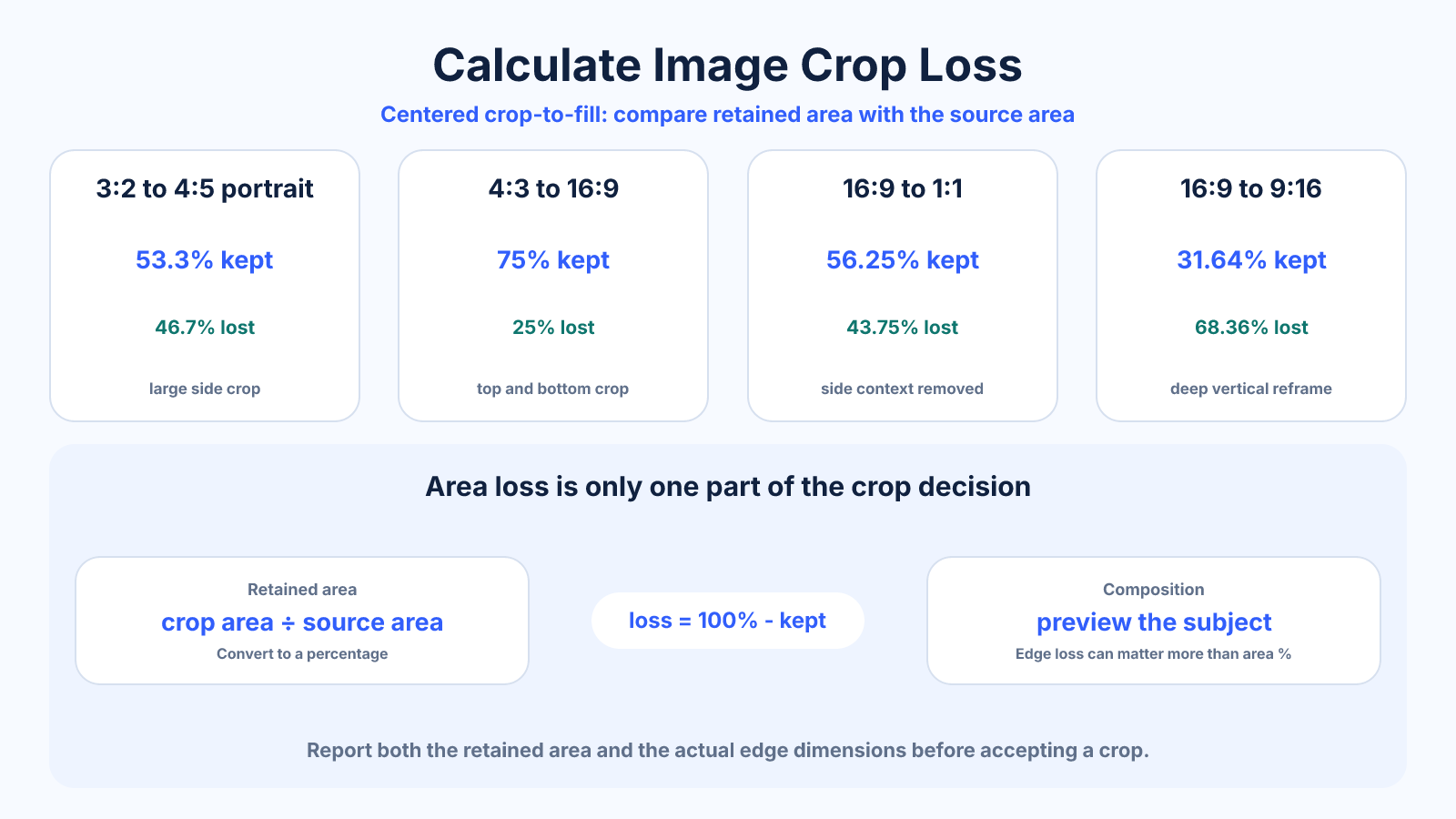
For a centered crop-to-fill, scale the target ratio to the largest rectangle that fits inside the source. Crop loss equals one minus retained area divided by source area. Report both area percentage and edge dimensions because the same percentage can affect compositions differently.
What matters most
- Area loss differs from width or height loss.
- Only one dimension is cropped when upright source and target rectangles are aligned.
- Crop position changes which pixels disappear, not how many.
How to apply it
- Simplify or calculate the source and target ratios.
- Find the largest target-shaped rectangle inside the source.
- Subtract crop dimensions from source dimensions.
- Divide retained area by source area and convert loss to a percentage.
- Preview the actual subject before accepting the calculated crop.
Reference table
| Conversion | Retained area | Area lost | Typical issue |
|---|---|---|---|
| 3:2 to 4:5 portrait | 53.3% | 46.7% | Large side crop |
| 4:3 to 16:9 | 75% | 25% | Top and bottom crop |
| 16:9 to 1:1 | 56.25% | 43.75% | Side context removed |
| 16:9 to 9:16 | 31.64% | 68.36% | Deep vertical reframe |
Use exact dimensions and units in production notes; familiar labels can describe more than one standard.
Distinguish edge loss from area loss
When 4000 × 3000 is cropped to 16:9, the largest crop is 4000 × 2250. Height falls by 750 pixels, or 25%, and retained area also falls by 25% because width is unchanged. The removal can be split 375 pixels above and below when centered.
With other descriptions, people may quote loss from each edge, total width or area without naming it. State the denominator and units. “840 pixels total width removed” is clearer than “43.75% crop” when an editor needs crop guides.
- Name total versus per-edge loss.
- Report pixels and percentage.
- Use area when discussing retained image information.
Use exact dimensions rather than labels
1366 × 768 is close to 16:9 but not exact. A calculation based on the marketing family can differ by pixels from the real raster. Read the source file and use its stored orientation before calculating a delivery crop.
Likewise, a camera may produce dimensions affected by in-camera ratio settings or stabilization. Calculate from the actual exported master, not only sensor megapixels or a menu label.
- Read stored width and height.
- Apply rotation metadata correctly.
- Avoid rounding the source ratio early.
Translate the percentage into composition risk
A 40% area loss can be harmless when it removes empty sky, or destructive when it removes half a group. Overlay the crop on representative images and identify protected content. Percentage quantifies the change but does not evaluate the photograph.
For moving video, inspect the entire shot. A safe opening frame can fail when a subject crosses into the removed region. Keyframe the crop, cut to another angle or use a fitted layout when the protected region is wider than the destination.
- Mark protected regions.
- Review motion through time.
- Use fit when complete information matters.
Compare crop loss with fit space
The alternative to crop-to-fill is fitting the complete source. This produces no source-area loss but leaves part of the destination unused. Calculate bar dimensions and decide whether neutral padding, a designed background or a different ratio better serves the task.
Document the chosen compromise. Full-bleed marketing imagery may justify crop; diagrams and legal content usually favor fit. Do not stretch merely to avoid acknowledging either tradeoff.
Common mistakes to avoid
- Calling 25% width loss the same as 25% area loss in every case.
- Calculating from a familiar ratio instead of exact source dimensions.
- Assuming crop percentage determines whether composition works.
- Forgetting rotation before comparing width and height.
Continue with the right tool
Use a calculator to check the numbers against your own source and destination instead of relying on a generic preset.
Related guides
How to Crop an Image to an Aspect Ratio Without Stretching
Calculate and position an exact aspect-ratio crop while preserving natural proportions, important content and enough pixels for output.
Image cropping and print preparationWhich Aspect Ratio Should You Use for Photography?
Choose between 3:2, 4:3, 4:5, 1:1 and panoramic photo ratios based on capture, composition, print and delivery needs.
Image cropping and print preparationCropping vs Resizing an Image: What Actually Changes?
Understand how cropping and resizing affect composition, aspect ratio, pixel dimensions and quality so you can choose the correct operation.
Frequently asked questions
How is crop-loss percentage calculated?
Loss percent = (1 − retained crop area ÷ original area) × 100.
Does moving the crop change the percentage?
No. It changes which pixels are retained while crop dimensions stay the same.
Why is 16:9 to 9:16 loss so large?
The destination is far narrower relative to height, retaining only about 31.6% of an aligned 16:9 frame when filled.
Can padding avoid crop loss?
Yes. Fit preserves the source but creates unused canvas around it.