
The short version
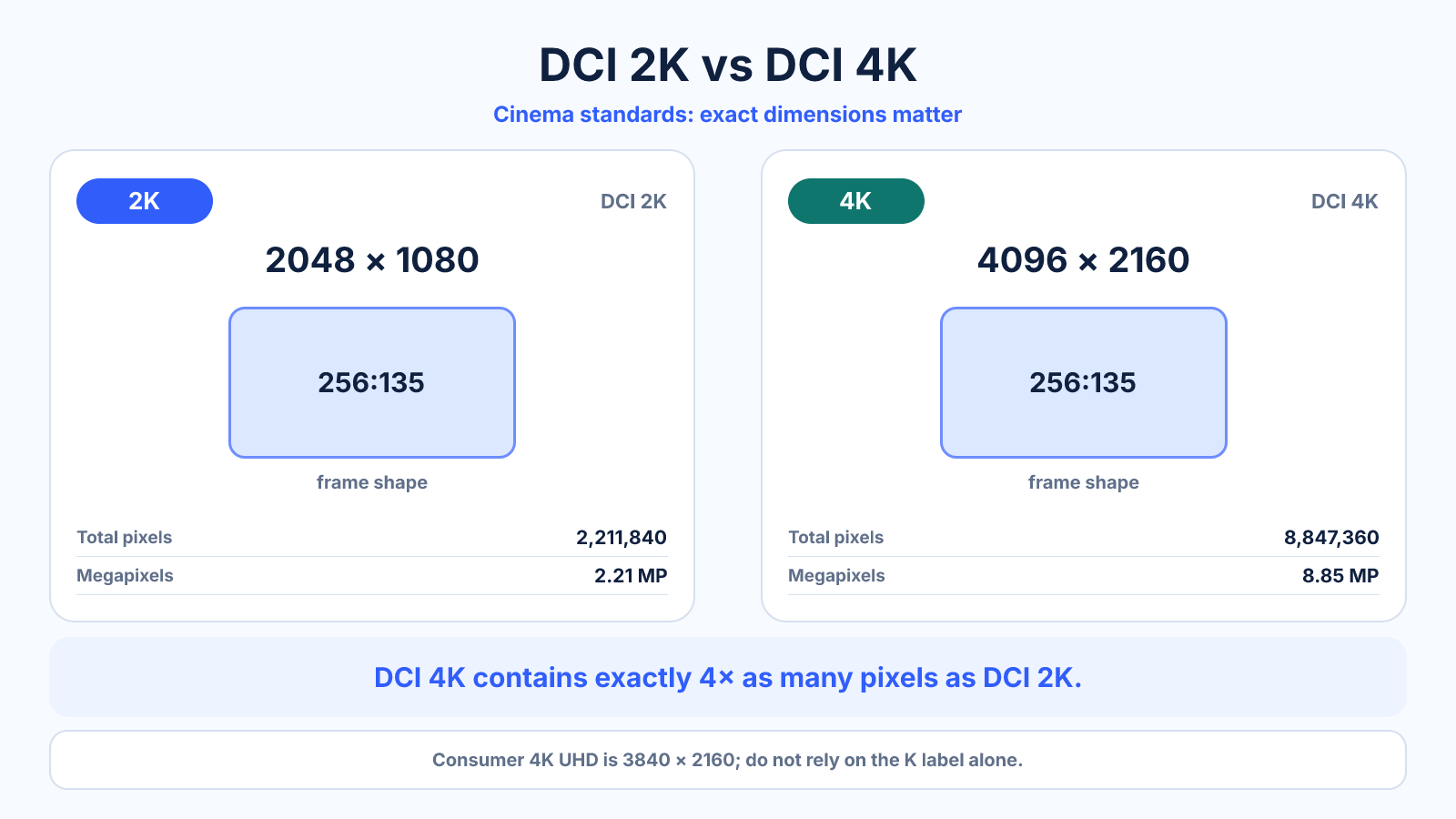
DCI 2K is 2048 × 1080 and DCI 4K is 4096 × 2160, both using a 256:135 container ratio. Consumer products often call 2560 × 1440 '2K' and 3840 × 2160 '4K,' so exact dimensions matter more than the label.
What matters most
- Cinema and consumer standards use different frames.
- DCI 4K has exactly four times the pixels of DCI 2K.
- Always state pixel dimensions in production specifications.
How to apply it
- Identify whether the workflow is cinema, broadcast, web or computer display.
- Read the exact width and height rather than the K label.
- Choose the corresponding aspect ratio and scaling method.
- Confirm the delivery specification before encoding.
Reference table
| Label | Exact dimensions | Context |
|---|---|---|
| DCI 2K | 2048 × 1080 | Digital cinema container |
| 1440p/QHD | 2560 × 1440 | Computer displays |
| 4K UHD | 3840 × 2160 | Consumer video and displays |
| DCI 4K | 4096 × 2160 | Digital cinema container |
Use exact dimensions and units in production notes; familiar labels can describe more than one standard.
Why the term 2K is ambiguous
In digital cinema, DCI 2K is 2048 x 1080, named for its approximate horizontal pixel count. In monitor marketing, 2560 x 1440 QHD is frequently called 2K even though its width is much closer to 2.5K. These are different rasters and aspect ratios.
Always record exact width and height when planning a timeline, monitor, camera or security system. A label alone cannot guarantee compatibility, pixel count or shape. The device specification should state the actual dimensions.
4K UHD versus DCI 4K
Consumer 4K UHD is 3840 x 2160 and uses 16:9. DCI 4K is 4096 x 2160 and uses the wider 256:135 ratio. Both have 2160 vertical pixels, but the cinema frame has 256 additional horizontal pixels.
A 4096-wide source placed into a 3840-wide UHD timeline must be cropped or scaled, depending on the workflow. Do not silently stretch it. Choose the target standard from the delivery specification before editing or exporting.
Pixel count, workload and storage
DCI 4K contains four times the pixels of DCI 2K because both dimensions double. Consumer UHD has four times the pixels of 1080p. Compared with 2560 x 1440 QHD, 3840 x 2160 UHD has 2.25 times the pixels.
Rendering and encoding cost generally increases with pixels, but not by one fixed factor. Codec, frame rate, effects, bit depth and hardware acceleration matter. File size follows bitrate and duration more directly than the resolution label alone.
Choose the standard from the use case
For cinema delivery, follow the required DCI raster and container. For consumer video and televisions, UHD is the usual 4K frame. For monitors, compare exact QHD or UHD dimensions, pixel density, refresh rate and GPU capability rather than relying on the word 2K.
Security cameras use 2K and 4K labels inconsistently across products. Compare sensor output, recorded stream dimensions, bitrate, lens coverage and low-light quality. A marketing resolution does not guarantee useful captured detail.
Scaling between 2K and 4K
Exact DCI 2K to DCI 4K and 1080p to UHD can use a two-times scale along each axis. QHD to UHD is a 1.5-times scale per axis, which is not an integer mapping. Scaling quality depends on the algorithm and source detail.
Keep the higher-quality master and generate each required delivery directly. Avoid passing through several intermediate sizes, because repeated scaling and compression can soften the image and introduce artifacts.
Common mistakes to avoid
- Treating every use of 2K as 2560 × 1440.
- Mixing DCI and UHD footage without planning crop or padding.
- Communicating only a marketing name to collaborators.
Continue with the right tool
Use a calculator to check the numbers against your own source and destination instead of relying on a generic preset.
Related guides
How to Calculate Video File Size from Bitrate and Duration
Estimate video storage from total bitrate and running time, with worked examples and the difference between decimal MB and binary MiB.
Video quality and deliveryVideo Resolution Chart: SD, HD, Full HD, 2K, 4K and 8K
Compare common video resolutions, pixel counts, aspect ratios and practical uses without confusing consumer UHD and cinema formats.
Video quality and delivery720p vs 1080p: Resolution, Pixel Count and File Size
Compare 1280×720 and 1920×1080 video, including pixel count, scaling, bandwidth and when each resolution makes sense.
Frequently asked questions
Is 1440p true 2K?
Not by the DCI cinema definition; the name is nevertheless common in monitor marketing.
Is 4K exactly double 2K?
The width and height double within matching DCI standards, producing four times the pixels.
Which 4K should YouTube use?
Standard 16:9 consumer delivery normally uses 3840 × 2160 rather than the wider DCI container.