
The short version
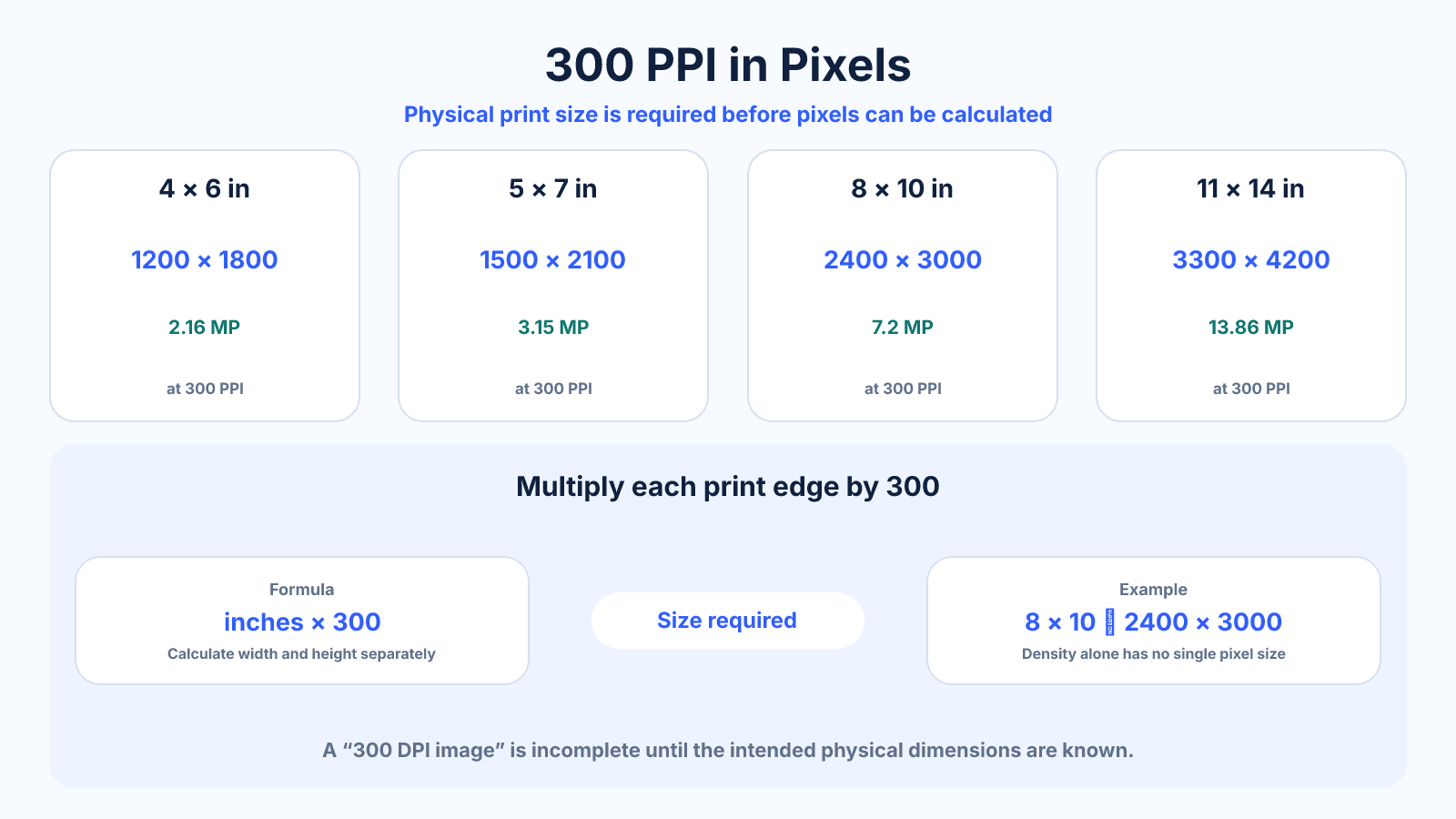
At 300 pixels per inch, multiply each print dimension in inches by 300. An 8×10 print requires 2400 × 3000 pixels. “300 DPI” alone has no single pixel dimension because the physical width and height are missing.
Use this guide when
Use this guide for the narrow conversion from physical dimensions to pixels at the commonly requested 300 pixels per inch.
Choose a different guide when:
- To understand why image PPI and printer DPI differ, read DPI vs PPI: The Difference for Images, Screens and Printing.
- To choose a density other than 300 PPI, read Image Resolution for Print: How Many Pixels Do You Need?.
What matters most
- DPI or PPI needs a physical print size to produce pixel dimensions.
- Metadata set to 300 does not add captured detail.
- Centimeters must be divided by 2.54 before multiplying by PPI.
How to apply it
- Record final trim width and height in inches or centimeters.
- Convert centimeters to inches when necessary.
- Multiply width and height independently by 300.
- Add bleed according to printer instructions.
- Compare required pixels with the cropped source raster.
Reference table
| Print size | 300-PPI pixels | Approx. MP | Ratio |
|---|---|---|---|
| 4×6 in | 1200 × 1800 | 2.16 | 2:3 |
| 5×7 in | 1500 × 2100 | 3.15 | 5:7 |
| 8×10 in | 2400 × 3000 | 7.2 | 4:5 |
| A4 | 2480 × 3508 | 8.70 | 1:√2 approx. |
| 11×14 in | 3300 × 4200 | 13.86 | 11:14 |
Use exact dimensions and units in production notes; familiar labels can describe more than one standard.
DPI needs a physical dimension
A density describes how many samples occupy a unit of distance; it does not state how much distance exists. Therefore 300 PPI can describe 900 × 1200 pixels at 3×4 inches or 2400 × 3000 at 8×10. Both use the same density and have different raster sizes.
Always request print width, height and unit alongside the density. If only pixels are known, divide pixels by intended inches to calculate supplied PPI instead of assigning an arbitrary metadata number.
- Density × distance = pixels.
- Pixels ÷ distance = supplied PPI.
- Write width and height separately.
Convert metric print sizes correctly
One inch equals exactly 2.54 centimeters. For a 20 × 30 cm print at 300 PPI, divide each dimension by 2.54, then multiply by 300, producing approximately 2362 × 3543 pixels after rounding.
Do not multiply centimeters directly by 300. State the rounding method and follow a printer template when it provides specific pixel dimensions, bleed or scaling instructions.
- Divide centimeters by 2.54.
- Round only final pixels.
- Prefer provider specifications for production.
Understand what resolution metadata changes
A 3000 × 2400 image contains 7.2 million pixels whether metadata says 72, 300 or 600 PPI. Changing the metadata without resampling changes the default physical size: at 300 PPI it maps to 10 × 8 inches.
Resampling is different because it changes pixel dimensions. Enlarging can make a file meet a requested raster size, but the new samples are estimated from existing data. Inspect actual sharpness and do not present interpolated pixels as newly captured detail.
- Metadata maps pixels to physical scale.
- Resampling changes raster dimensions.
- Neither repairs focus or motion blur.
Add crop, bleed and proofing
Calculate from final trim size, then add printer-specified bleed outside it. Keep important content inside a safe inset because cutting and borderless enlargement have tolerance. An exact 2400 × 3000 8×10 may not include the extra area a lab requests.
Export in the requested format and color space, verify stored pixel dimensions and order a proof for critical work. A mathematically correct file can still print poorly because of source quality, sharpening, color conversion or paper choice.
Common mistakes to avoid
- Asking for 300-DPI pixels without naming physical dimensions.
- Changing only a metadata field and expecting sharper output.
- Confusing printer hardware DPI with image PPI.
- Forgetting bleed beyond final trim.
Continue with the right tool
Use a calculator to check the numbers against your own source and destination instead of relying on a generic preset.
Related guides
DPI vs PPI: The Difference for Images, Screens and Printing
Understand DPI versus PPI, which value belongs in image calculations and why changing metadata alone does not add detail.
Image cropping and print preparationHow Many Megapixels Do You Need for a Print?
Calculate megapixels for print dimensions and PPI while accounting for aspect-ratio crop, source detail and viewing distance.
Image cropping and print preparationPoster Resolution: Choosing DPI by Size and Viewing Distance
Choose realistic poster pixel dimensions by physical size, viewing distance, source detail and printer requirements instead of one fixed DPI rule.
Frequently asked questions
How many pixels is 300 DPI?
It depends on print size. One inch spans 300 pixels; 10 inches spans 3000 pixels.
Is 300 DPI the same as 300 PPI?
They are often used interchangeably in delivery instructions, but printer dots and image pixels are different physical concepts.
Can I make an image 300 DPI by editing metadata?
You can change its declared print scale, but no new source detail appears unless pixels are resampled.
How many pixels is A4 at 300?
Using 210 × 297 mm and rounded pixel dimensions, approximately 2480 × 3508.