
The short version
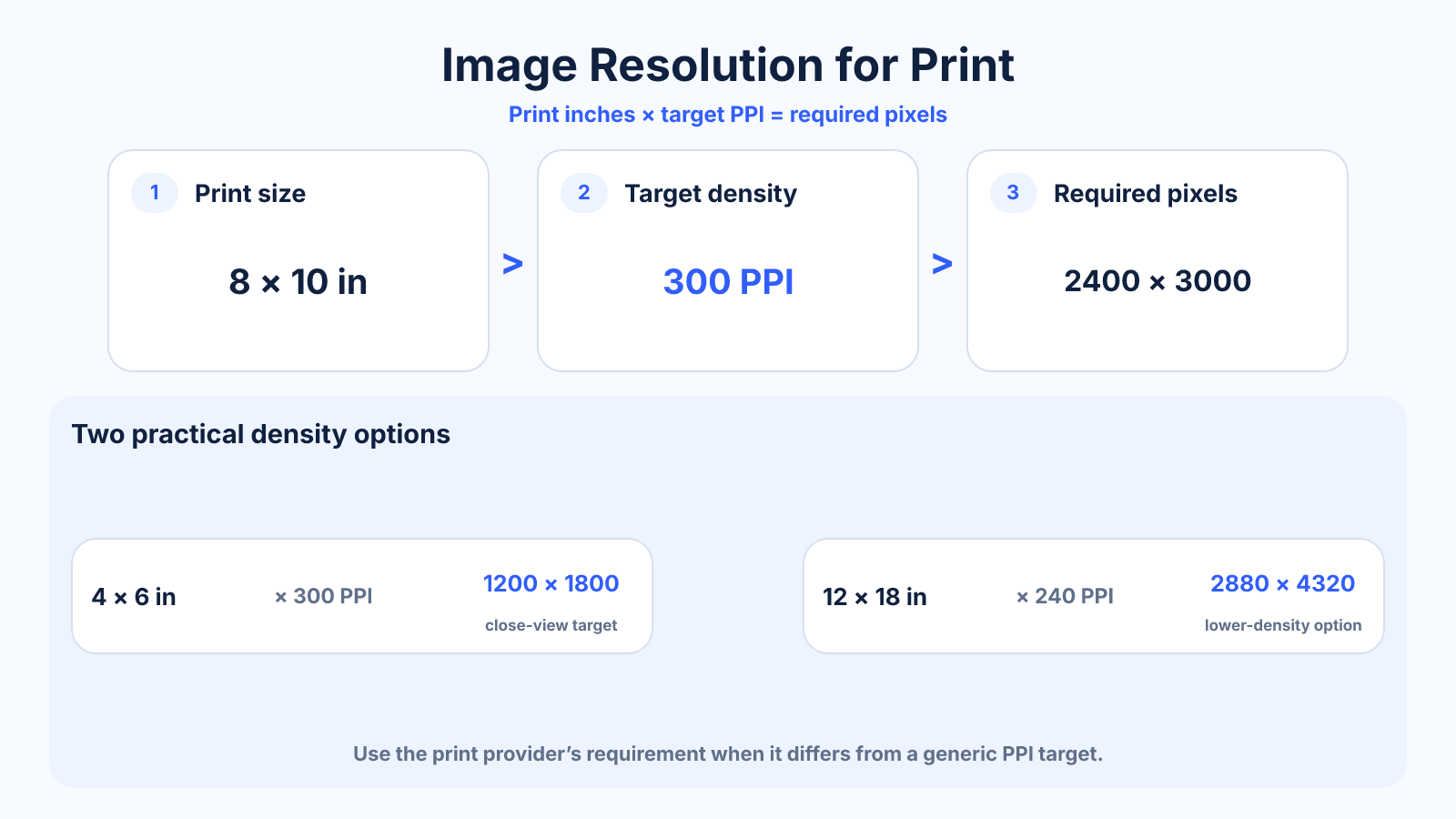
Multiply desired print width and height in inches by the target pixels per inch. An 8 × 10 inch print at 300 PPI needs 2400 × 3000 pixels.
Use this guide when
Use this guide when you know the intended print dimensions and need the required pixel dimensions at a chosen PPI.
Choose a different guide when:
- To start from total camera megapixels, read How Many Megapixels Do You Need for a Print?.
- To convert a 300 PPI target into exact pixels, read What Does 300 DPI Mean in Pixels?.
What matters most
- PPI connects a digital pixel grid to physical print size.
- 300 PPI is a common close-view target, not a universal requirement.
- Large prints viewed farther away can look good at lower density.
How to apply it
- Get the source pixel dimensions.
- Choose final print inches and realistic viewing distance.
- Divide pixels by inches to find available PPI, or multiply inches by PPI for required pixels.
- Soft-proof, sharpen for output and follow the print provider's instructions.
Reference table
| Pixels at 300 PPI | Pixels at 240 PPI | |
|---|---|---|
| 4 × 6 in | 1200 × 1800 | 960 × 1440 |
| 5 × 7 in | 1500 × 2100 | 1200 × 1680 |
| 8 × 10 in | 2400 × 3000 | 1920 × 2400 |
| 12 × 18 in | 3600 × 5400 | 2880 × 4320 |
Use exact dimensions and units in production notes; familiar labels can describe more than one standard.
Calculate required pixels for a print
Multiply the intended width and height in inches by the target pixels per inch. An 8 x 10-inch print at 300 PPI needs 2400 x 3000 pixels. A 12 x 18 at 240 PPI needs 2880 x 4320 pixels. Keep the orientation consistent when entering dimensions.
To calculate available density from an existing file, divide each pixel dimension by the corresponding print dimension in inches. Use the lower result if the axes differ after crop or rounding, because it represents the limiting direction.
Choose 300, 240, 200 or 150 PPI
Around 300 PPI is a common target for close-viewed photographic prints. A clean 240-PPI file can also produce excellent results. Larger wall prints viewed from farther away may be acceptable near 200 or 150 PPI, depending on source quality and the print process.
These are planning ranges, not universal guarantees. Paper, printer, sharpening, subject detail and viewing distance all matter. Use the print provider's recommendation and order a proof when color or fine detail is critical.
Crop to the print ratio before judging resolution
A file can contain enough total pixels but lose many of them when cropped to a different print shape. A 3:2 camera image fits 4 x 6, but 8 x 10 is 4:5 and removes part of the long edges when printed full bleed.
Set the intended crop first, protect important content and then read the remaining pixel dimensions. Calculate effective PPI from that cropped area. If the composition cannot tolerate the crop, choose a border, a different print size or another source.
When should you upscale for printing?
Upscaling can create a larger pixel grid and may help a printer or layout application process the file smoothly, but it cannot restore authentic detail. First consider a smaller print, lower but realistic PPI target or greater viewing distance.
If enlargement is necessary, use one controlled upscale from the best original, inspect faces, text and repeated patterns, and sharpen for final output size. Keep the untouched source because generated or interpolated pixels should remain reversible.
Print-ready image checklist
Confirm finished size, bleed, crop, pixel dimensions, effective PPI, color space and accepted file type. Keep captions and faces away from trim and mat openings. Avoid repeated JPEG saves and inspect the file at print size rather than only at extreme zoom.
Do not change a 72-DPI metadata tag and assume the file is fixed. If resampling is disabled, the pixels remain unchanged. The useful question is how many source pixels will occupy each printed inch after the final crop.
Common mistakes to avoid
- Changing only the DPI tag and assuming pixels were added.
- Ignoring crop differences between source and paper ratios.
- Applying screen sharpening without checking a print proof.
Continue with the right tool
Use a calculator to check the numbers against your own source and destination instead of relying on a generic preset.
Related guides
DPI vs PPI: The Difference for Images, Screens and Printing
Understand DPI versus PPI, which value belongs in image calculations and why changing metadata alone does not add detail.
Print and densityWhat Is DPI? Printer Resolution Without the Common Myths
Learn what dots per inch means for printers, how it differs from image pixels and why a DPI metadata value alone does not change quality.
Image cropping and print preparationHow Many Megapixels Do You Need for a Print?
Calculate megapixels for print dimensions and PPI while accounting for aspect-ratio crop, source detail and viewing distance.
Frequently asked questions
Is 300 PPI always necessary?
No. It is a useful high-quality target for close viewing, but printer process, subject and distance matter.
What if my image has fewer pixels?
Use a smaller print, accept lower density or carefully upscale and inspect a test print.
Should I use DPI or PPI for image math?
Use PPI for pixels mapped to inches; printers use DPI for their physical dot placement.
Sources and further reading
These references support the technical definitions and platform-specific guidance used above.
- Adobe: image size and resolutionReference for the relationship among pixels, print dimensions and PPI.