
The short version
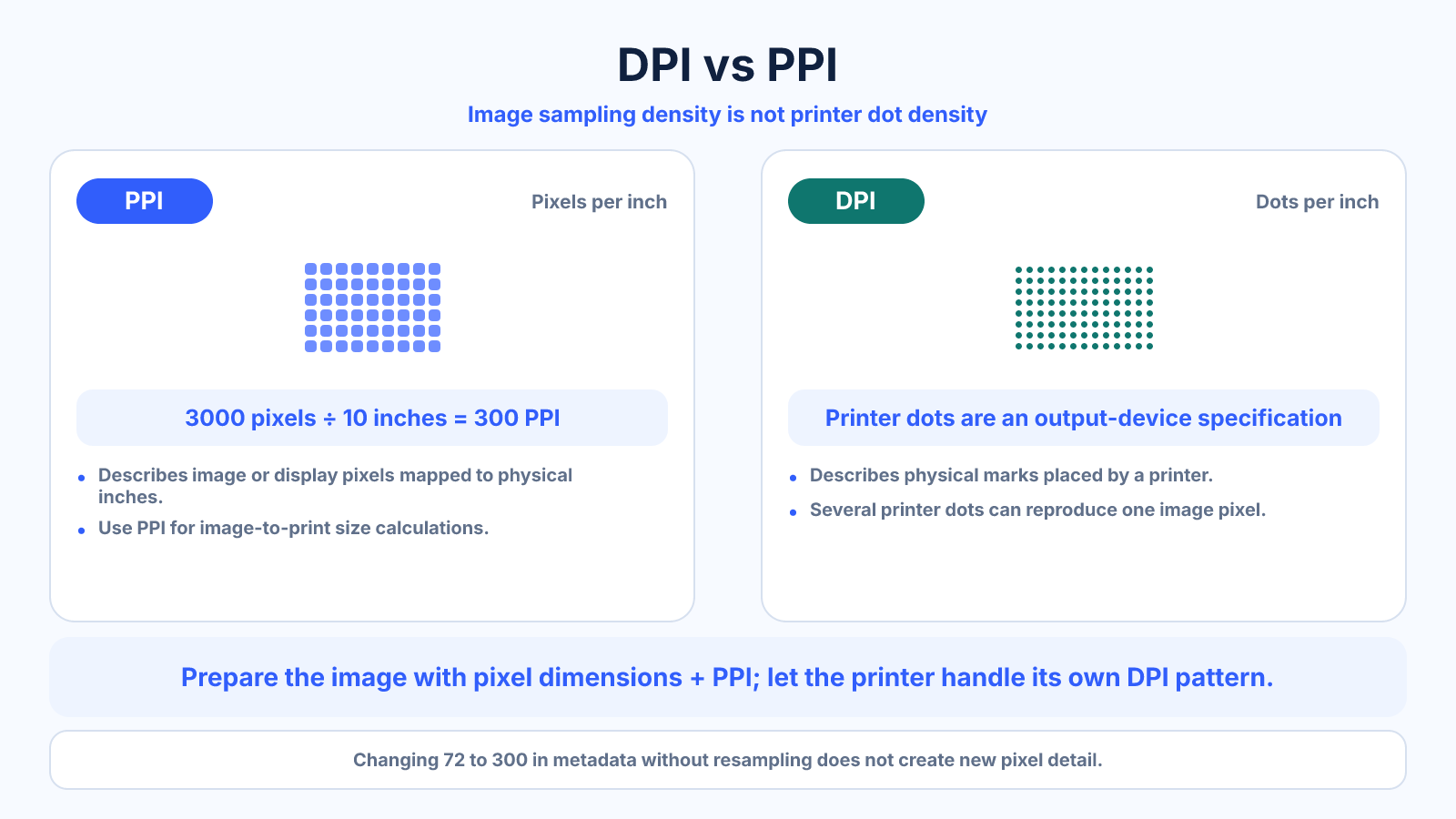
PPI describes image pixels per physical inch; DPI describes printer dots per inch. They are often used loosely, but image-to-print size calculations should use PPI.
Use this guide when
Use this comparison when you need to distinguish image sampling density from a printer's dot-placement specification.
Choose a different guide when:
- To focus on printer output, read What Is DPI? Printer Resolution Without the Common Myths.
- To focus on image pixels and display density, read Pixels per Inch (PPI) Explained for Images, Prints and Screens.
What matters most
- Pixels are image samples; printer dots are physical marks.
- One pixel may be reproduced with multiple ink dots.
- Pixel dimensions remain the primary measure of digital image information.
How to apply it
- Read the image's pixel dimensions.
- Choose a target print size.
- Divide pixels by inches to calculate PPI.
- Let the printer driver or print service handle device-specific dot patterns.
Reference table
| Term | Measures | Example |
|---|---|---|
| PPI | Image pixels per inch | 3000 pixels across 10 inches = 300 PPI |
| DPI | Printer dots per inch | A printer may place many ink dots per image inch |
| Pixel dimensions | Digital grid | 3000 × 2400 pixels |
| Megapixels | Total pixels | 7.2 MP |
Use exact dimensions and units in production notes; familiar labels can describe more than one standard.
The practical difference between DPI and PPI
PPI measures how many image or display pixels occupy one physical inch. DPI measures how densely an output device places physical dots. A printer can use several colored dots to represent one image pixel, so printer DPI and image PPI are not interchangeable counts.
For file preparation, start with pixel dimensions and intended print inches. For device comparison, examine the printer's own specifications and process. Keeping those two questions separate prevents the common mistake of trying to convert a printer's maximum DPI directly into required image pixels.
What a request for a 300 DPI image usually means
Many clients and print services say ‘300 DPI’ when they actually want 300 pixels per printed inch. The phrase is common, but it is incomplete without physical dimensions. A 4 x 6-inch print at 300 PPI needs 1200 x 1800 pixels, while an 8 x 10 needs 2400 x 3000.
Ask for the finished size, bleed, color profile and file type. Then calculate pixels from inches multiplied by requested PPI. The printer or raster image processor converts those image samples into its own dot pattern during output.
Metadata changes versus real resampling
Changing a density field from 72 to 300 without resampling does not add pixels. It only changes the physical size implied when software honors that metadata. A 3000-pixel edge can represent 41.7 inches at 72 PPI or 10 inches at 300 PPI while the image data remains unchanged.
Resampling actually changes pixel dimensions. Downsampling discards samples; upsampling estimates new ones. Before resampling, calculate the current effective PPI at the required print size. You may already have enough pixels even if the stored metadata says 72.
Which value matters for web, screens and print?
For websites, actual pixel dimensions, rendered CSS size, responsive sources and compression matter. The embedded PPI or DPI tag usually does not control browser display size. For a monitor, physical PPI depends on panel resolution and diagonal size.
For printing, calculate effective image PPI from pixels and finished inches, then follow the provider's guidance. Printer DPI belongs to the output device. This simple division of responsibilities is more reliable than using either abbreviation as a generic synonym for quality.
Common mistakes to avoid
- Using printer DPI as the number of required image pixels.
- Believing 72 versus 300 in metadata changes the image when pixel dimensions stay fixed.
- Ignoring viewing distance and print process.
Continue with the right tool
Use a calculator to check the numbers against your own source and destination instead of relying on a generic preset.
Related guides
What Is DPI? Printer Resolution Without the Common Myths
Learn what dots per inch means for printers, how it differs from image pixels and why a DPI metadata value alone does not change quality.
Print and densityPixels per Inch (PPI) Explained for Images, Prints and Screens
Learn what pixels per inch means, calculate PPI for images, prints and screens, and understand how PPI differs from printer DPI.
Print and densityImage Resolution for Print: How Many Pixels Do You Need?
Calculate print resolution from inches and PPI, choose a realistic density and avoid unnecessary upscaling.
Frequently asked questions
Is 300 DPI the same as 300 PPI?
People often say so, but technically the first refers to printer dots and the second to image pixels.
Does changing 72 PPI to 300 PPI improve quality?
Not unless resampling adds pixels. Without resampling it only changes the implied physical size.
Which value should a photographer calculate?
Pixel dimensions and PPI for the intended print size.
Sources and further reading
These references support the technical definitions and platform-specific guidance used above.
- Adobe: image size and resolutionReference for pixel dimensions, print dimensions and resolution settings.