
The short version
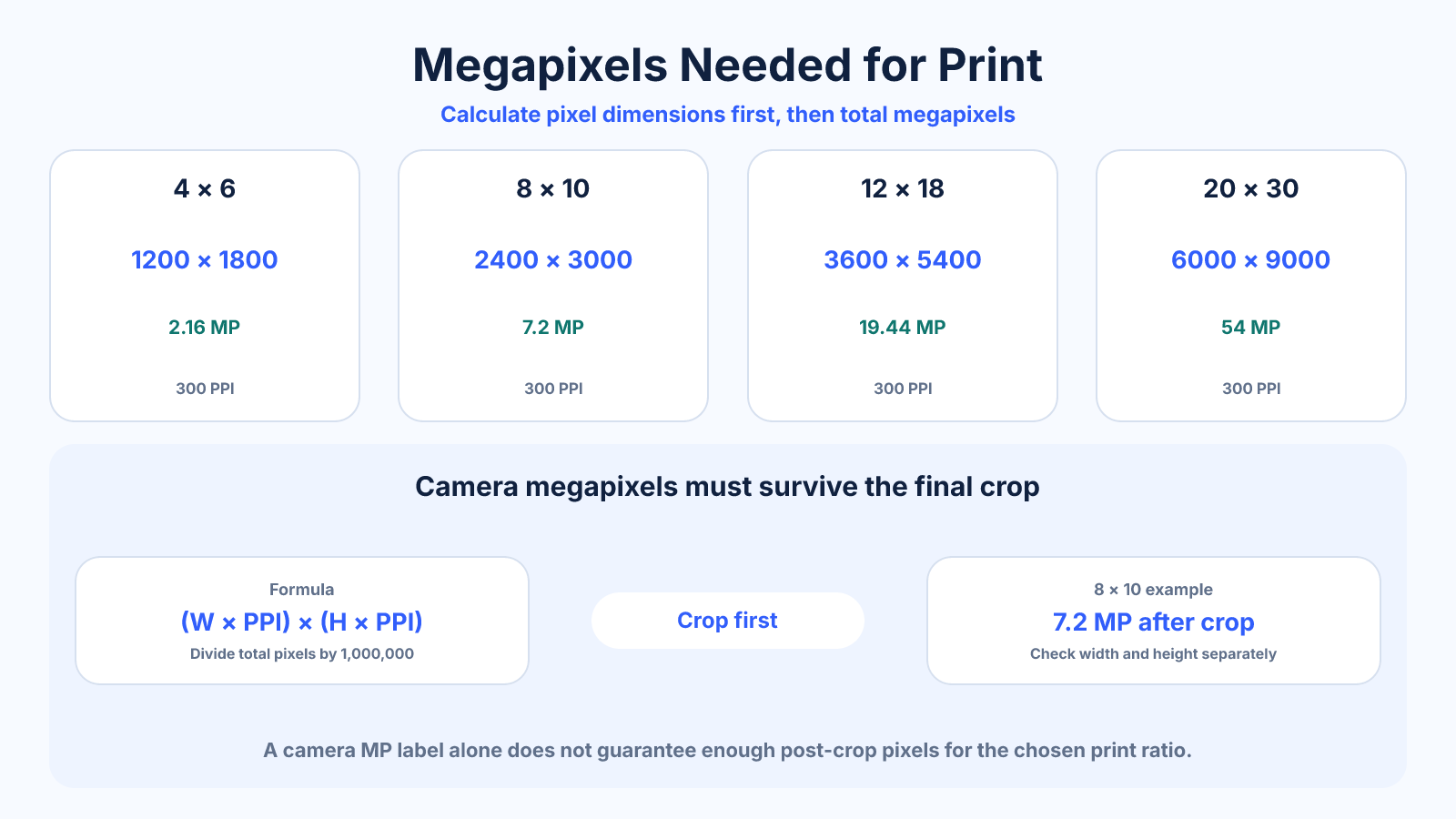
Required megapixels equal print width × PPI multiplied by print height × PPI, divided by one million. An 8×10 at 300 PPI needs 2400 × 3000, or 7.2 MP after crop. Camera megapixels must be evaluated after the image is cropped to the print ratio.
Use this guide when
Use this guide to translate a camera or image megapixel count into realistic print sizes and proportions.
Choose a different guide when:
- To start from a fixed print size, read Image Resolution for Print: How Many Pixels Do You Need?.
- To judge an undersized file at viewing distance, read Can a Low-Resolution Image Make a Good Large Print?.
What matters most
- Megapixels describe pixel count, not lens sharpness or composition.
- Print ratio crop can discard a meaningful part of camera resolution.
- Larger viewing distance can permit lower PPI.
How to apply it
- Choose final print dimensions and orientation.
- Select a realistic PPI for process and viewing distance.
- Multiply each print dimension by PPI.
- Multiply resulting pixel width and height for required megapixels.
- Compare with post-crop source dimensions and inspect actual detail.
Reference table
| At 300 PPI | Megapixels | At 200 PPI | |
|---|---|---|---|
| 4×6 | 1200 × 1800 | 2.16 MP | 800 × 1200 / 0.96 MP |
| 8×10 | 2400 × 3000 | 7.2 MP | 1600 × 2000 / 3.2 MP |
| 12×18 | 3600 × 5400 | 19.44 MP | 2400 × 3600 / 8.64 MP |
| 20×30 | 6000 × 9000 | 54 MP | 4000 × 6000 / 24 MP |
Use exact dimensions and units in production notes; familiar labels can describe more than one standard.
Calculate pixel dimensions before megapixels
For an 11×14 print at 300 PPI, multiply 11 × 300 = 3300 and 14 × 300 = 4200. The raster contains 13,860,000 pixels, or 13.86 MP. This is the delivery requirement, not necessarily the minimum camera label.
If the source ratio differs, calculate the crop first. A 3:2 sensor file used for an 11:14 print loses side area, so a camera with exactly 13.86 MP may not retain enough pixels after crop. Compare width and height separately, not only totals.
- Print inches × PPI gives pixels.
- Pixels multiplied gives total count.
- Check each dimension after crop.
Megapixels are not the same as resolved detail
Blur from focus error, camera shake, lens softness, noise reduction or aggressive compression can make a high-MP file carry less useful detail than its dimensions imply. Conversely, a clean lower-resolution file can produce a satisfying print at an appropriate size.
Inspect important texture and edges in the actual file. Do not rely only on camera specifications. Upscaling creates more samples and can improve print processing, but it does not retroactively change what the lens and sensor captured.
- Evaluate the real image.
- Separate raster dimensions from sharpness.
- Treat upscale as processing, not capture.
Match PPI to viewing conditions
Small photographs are often examined closely and benefit from higher pixel density. Large posters and wall art are commonly viewed farther away, allowing lower PPI to appear continuous. Printer process, paper and subject detail also influence a useful target.
Use 300 PPI as a strong close-view reference, not a universal law. Calculate alternatives such as 240, 200 and 150 PPI, create a crop or section proof at physical size, and judge from the intended distance.
- Use context, not one universal number.
- Proof a detailed section.
- Ask the printer for process guidance.
Plan capture and crop together
If a project requires several print ratios, frame with safe edge room or capture alternative compositions. A 24MP 3:2 file does not provide 24MP inside every square or 4:5 crop. Record the demanding final dimensions before the shoot.
Keep raw or highest-quality originals, perform one final resize after crop and save output derivatives separately. This retains maximum flexibility and prevents a small delivered JPEG from becoming the source for a larger print.
Common mistakes to avoid
- Using total sensor MP without accounting for crop.
- Assuming every pixel contains equal useful detail.
- Demanding 300 PPI for a distant poster without evaluating context.
- Upscaling and describing interpolated pixels as captured megapixels.
Continue with the right tool
Use a calculator to check the numbers against your own source and destination instead of relying on a generic preset.
Related guides
Image Resolution for Print: How Many Pixels Do You Need?
Calculate print resolution from inches and PPI, choose a realistic density and avoid unnecessary upscaling.
Image cropping and print preparationWhat Does 300 DPI Mean in Pixels?
Convert print inches or centimeters to pixels at 300 DPI and understand why DPI alone cannot specify an image size.
Image cropping and print preparationPoster Resolution: Choosing DPI by Size and Viewing Distance
Choose realistic poster pixel dimensions by physical size, viewing distance, source detail and printer requirements instead of one fixed DPI rule.
Frequently asked questions
How many megapixels are needed for 8×10?
At 300 PPI, 7.2 MP in the correct 4:5 crop; the uncropped camera file may need more.
Is 12MP enough for prints?
A 4000 × 3000 12MP file can produce about 13.3 × 10 inches at 300 PPI before ratio crop.
Does more megapixels guarantee sharper prints?
No. Focus, lens, motion, noise, processing and printer behavior also matter.
Can I print larger than the table?
Yes, often at lower PPI and longer viewing distance, after inspecting the real image.